How to Send Bulk WhatsApp Messages Without Getting Banned: The 2026 Guide
The complete technical guide to sending bulk WhatsApp campaigns safely: how platform spam detection works, why spintax prevents fingerprinting, IP isolation, warm-up schedules, and safe send pacing.
“Can I send bulk WhatsApp messages without getting banned?” is the single most common question in conversational marketing.
Every marketer has heard the horror stories: a company buys a desktop bulk sender or browser extension, imports a list of 5,000 phone numbers, clicks send, and wakes up the next morning to find their official business WhatsApp number permanently banned.
The truth is that bans are not random bad luck. Meta’s anti-spam machine operates on specific mathematical rules, network signals, and user feedback loops. When you understand how those systems work, you can design an infrastructure and operational workflow that keeps your numbers healthy and delivering.
This guide provides the complete engineering and operational blueprint for sending bulk WhatsApp campaigns safely in 2026.
The anatomy of a WhatsApp ban: What Meta actually tracks
WhatsApp messages are end-to-end encrypted using the Signal Protocol. This means Meta’s servers cannot read the content of your message to evaluate if it is promotional or spam.
Instead, Meta’s automated abuse detection relies on telemetry, metadata, and recipient actions:
| Detection Signal | What Meta Monitors & Analyzes | Trigger Threshold & Ban Risk | How to Safely Neutralize |
|---|---|---|---|
| 1. Recipient Feedback | “Block” and “Report Spam” button taps per 100 sends | >1–2% report rate triggers automated shadowban or instant suspension | Send strictly to opted-in contacts; always include a courteous “Reply STOP to unsubscribe” |
| 2. Payload Fingerprinting | Cryptographic hash and structural uniformity of outbound messages | Identical message text sent to 200+ contacts flags automated mass broadcasting | Use nested Spintax {Hey|Hi|Hello} to generate unique copy permutations on every dispatch |
| 3. Dispatch Velocity | Message cadence, interval spacing, and dispatch frequency | Rigid intervals (e.g. exactly 5.0 seconds) flag robotic automation scripts | Configure randomized human pacing delays (15–45 seconds) and cap hourly batch sizes |
| 4. Network Origin | IP address reputation, geographic anomalies, and proxy flags | Shared residential VPNs, flagged consumer ISPs, or dirty public proxy pools | Deploy on a single-tenant Cloud VPS with an isolated, static private IPv4 address |
| 5. Account Age & History | Sudden volume spikes on newly registered or inactive SIM cards | Blasting 500+ messages on day one of registration triggers instant algorithmic lockdown | Follow a strict 14-day warm-up ramp: start at 15–20 msgs/day, increasing gradually toward target volume |
If your campaign triggers multiple flags simultaneously—such as sending 1,000 identical messages from an un-warmed number across a 10-minute window—the system flags the behavior as automated abuse and suspends the line.
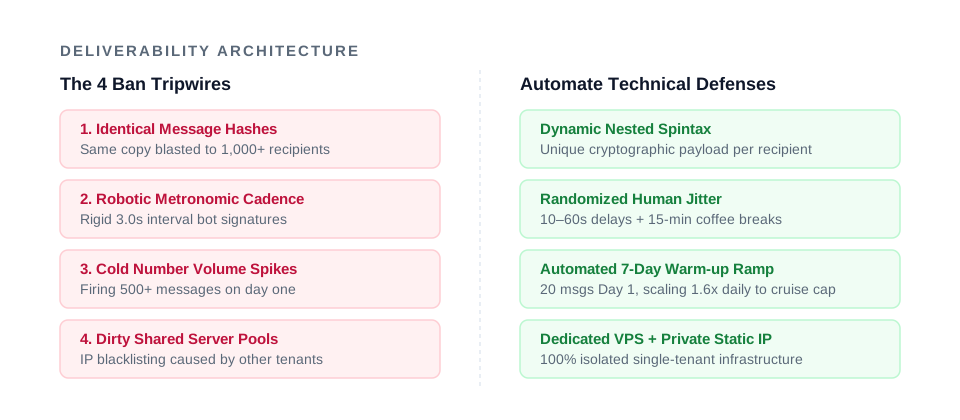
Here is how to systematically neutralize each of these triggers.
Rule 1: List hygiene and opt-in consent
User feedback is the heaviest weighting in Meta’s ban algorithm. When a recipient receives an unexpected message from an unknown sender, WhatsApp presents two prominent buttons: Block and Report Spam.
If more than 1–2% of recipients tap “Report Spam”, your number is placed in a high-risk sandbox or banned outright.
How to ensure safe list hygiene:
- Never buy contact databases (violates WhatsApp’s Business Messaging Policy): Cold outreach to purchased lists on WhatsApp is commercial suicide. Every person on your list must have an established relationship with your brand (previous customers, website opt-ins, newsletter subscribers).
- Clean invalid numbers before sending: Attempting to deliver to disconnected or invalid numbers raises your bounce rate and signals automated scraping. Use number validation tools to filter your CSV.
- Provide an effortless opt-out: Include a courteous exit option in your message: “Reply STOP to unsubscribe”. When a recipient replies “STOP”, respect it immediately. An opt-out reply costs nothing; a “Report Spam” click destroys your account.
Read our complete WhatsApp opt-in and consent guide for exact record-keeping practices.
Rule 2: Break identical payload hashes with Spintax
When legacy tools send a broadcast, they dispatch the exact same text 1,000 times:
“Hi John! Check out our weekend sale:
https://example.com/deal"
"Hi Sarah! Check out our weekend sale:https://example.com/deal”
Even with name replacement, the structural hash of the message is identical. WhatsApp’s gateway easily detects this repetitive pattern (see Meta’s official messaging limits and quality rating guidelines).
The Spintax Solution:
Spintax introduces dynamic variation syntax that assembles unique sentence permutations for every recipient:
{Hi|Hello|Hey|Good morning} {name}! {Don't miss our|Check out the|Take a look at our}
{weekend special|latest flash sale|exclusive discount}.
{Grab your items here|Browse the store here}: {link}
With 4 greeting variants, 3 intro phrases, and 3 promotional descriptors, this single template produces 36 unique message combinations. Recipient A receives:
“Good morning John! Don’t miss our weekend special. Grab your items here:
https://example.com/deal”
While Recipient B receives:
“Hey Sarah! Check out the latest flash sale. Browse the store here:
https://example.com/deal”
Because each message payload carries a distinct cryptographic signature, automated pattern detection cannot identify a uniform blast. Learn more in our complete spintax guide.
Rule 3: The structured 7-day number warm-up schedule
A brand new WhatsApp number has zero trust equity with the network. If you register a SIM card today and blast 500 messages tomorrow, it will be banned within hours.
Numbers must be “warmed up” by establishing a natural conversational baseline:
| Phase | Days | Daily Message Limit | Guidance |
|---|---|---|---|
| Phase 1: Baseline | Day 1–2 | 20–32 messages / day | Automated warm-up baseline; two-way replies with active customers. |
| Phase 2: Ramp | Day 3–4 | 51–82 messages / day | High-intent segments with nested spintax templates and randomized delays. |
| Phase 3: Scale | Day 5–6 | 131–210 messages / day | 1.6x daily automated multiplier pacing toward full campaign capacity. |
| Phase 4: Cruise | Day 7+ | 300+ messages / day | Sustainable daily ceiling per connection with automated coffee breaks. |
Read our detailed day-by-day protocol in the WhatsApp number warm-up guide.
Rule 4: Smart pacing and cadence randomization
Bots dispatch messages at exact, metronomic intervals: exactly one message every 3.00 seconds. Human beings never type or send with mechanical precision.
To emulate natural human behavior, your sending software must apply variable dispatch pacing:
- Randomized Delays: Set inter-message delays to fluctuate dynamically (e.g., 10 to 60 seconds randomized jitter between dispatches, rather than a fixed timer).
- Batch Micro-Pauses: Automate injects a 15-minute resting coffee break every 30 messages, plus a 30 messages/hour cap.
- Enforced Quiet Hours: Never dispatch campaigns between 10:00 PM and 8:00 AM in the recipient’s timezone. Messages received late at night suffer a 400% higher block and report rate. Automate enforces automated quiet hours natively.
See our analysis on send timing in the best time to send WhatsApp campaigns.
Rule 5: Dedicated IP isolation vs shared server pools
Where your server connects to the internet matters as much as what you send.
- Desktop extensions broadcast through your local home or office Wi-Fi, sharing dynamic IP pools that may have low trust scores.
- Multi-tenant SaaS platforms route thousands of clients through a shared cluster of outbound servers. If an unscrupulous sender on the same server blasts spam, their bad reputation can taint the shared IP, leading to collateral restrictions for your account.
The Fix: Single-tenant infrastructure. Each Automate plan provisions a dedicated virtual private server (VPS) with a private isolated IPv4 address. Your IP reputation is completely decoupled from any other business. See our breakdown in shared vs dedicated IP.
Rule 6: Multi-line load balancing
Attempting to push 5,000 messages through a single phone number in one afternoon is reckless. Professional campaign managers scale volume by horizontal distribution (multi-line rotation).
If you have a 3,000-contact list:
- Distributing across 1 number = 3,000 messages/day (High ban risk)
- Distributing across 10 connected lines = 300 messages/line/day (Safe, sustainable operating rhythm)
Automate’s Growth and Enterprise plans include 5 to 10 connected lines with built-in rotation and failover. If one number encounters temporary carrier throttling, the platform pauses that line and routes pending messages through alternate connected lines without dropping a contact.
Summary: The safe sending checklist
Before launching any WhatsApp campaign, verify your operational checklist:
- List Consent: Did every recipient explicitly opt in to hear from your business?
- Unsubscribe Path: Does your template provide a clear opt-out option (e.g. “Reply STOP”)?
- Spintax Enabled: Have you nested sentence variations to break uniform message hashing?
- Number Age: Has the sending line completed its 14-day warm-up ramp?
- Randomized Pacing: Are variable delays (20–50s) and micro-pauses active?
- Quiet Hours: Is dispatch scheduled strictly within daytime hours (8 AM – 10 PM)?
- Server Isolation: Are you sending from a dedicated VPS with a clean, private static IP?
By enforcing these technical and ethical controls, you can consistently achieve 98%+ open rates, high click-throughs, and zero unexpected bans.
Ready to run safe, high-volume campaigns on dedicated infrastructure? Explore Automate’s flat yearly plans or compare options on our alternatives overview.