WhatsApp Number Warm-Up: The Realistic Schedule, Day by Day
How WhatsApp number warm-up works: why new numbers must ramp slowly, a day-by-day schedule from 20 messages to full volume, and the mistakes that cost numbers.
Warm-up is the discipline of starting a new WhatsApp number slowly so the platform sees a person settling in, not a blaster switching on. Skip it, and the most common outcome is a number that delivers beautifully for two days and then never delivers again.
This guide gives the schedule in real numbers - what to send each day, when to step up, and the mistakes that waste the whole exercise. It is written from the ramp we build into Automate, where warm-up runs automatically for every new connection; the reasoning holds for any careful sending setup.
Why new numbers cannot send at full volume
Think about what a brand-new number sending 500 messages on day one looks like from the outside: a fresh account, no conversation history, messaging hundreds of people in its first hours. That pattern belongs to two kinds of accounts - compromised ones and spam farms - and the WhatsApp Terms of Service name automated bulk messaging among the violations enforcement is built to catch. They do not pause to ask whether you just bought a legitimate tool and got excited.
The volume-spike is one of the five real causes of restrictions, and warm-up is its direct antidote: the number earns its ceiling instead of announcing itself with a burst.
The day-by-day warm-up schedule
Here is the ramp that works, and the one Automate runs automatically. The daily cap grows about 1.6x per day from a starting point of 20:
| Day | Approx. cap/day |
|---|---|
| 1 | 20 |
| 2 | 32 |
| 3 | 51 |
| 4 | 82 |
| 5 | 131 |
| 6 | 210 |
| 7+ | your configured daily limit |
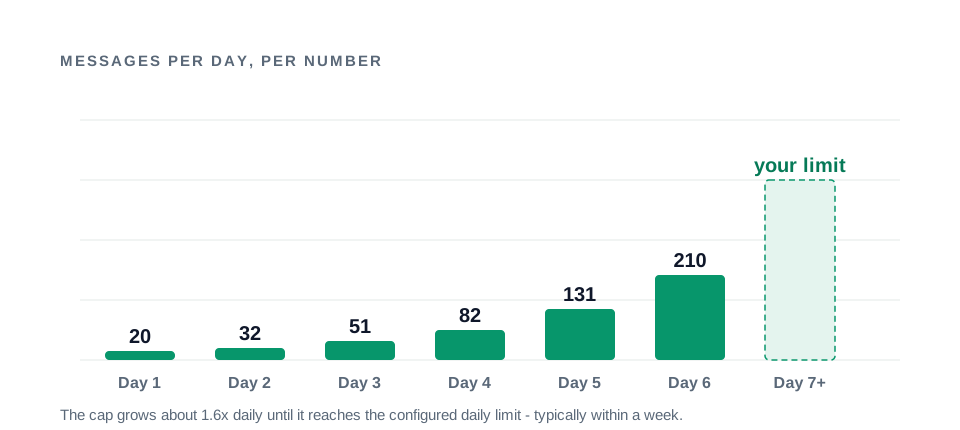
Two properties make this a schedule instead of a suggestion. First, the cap can only lower your configured limit, never raise it - a number set to 100/day simply reaches 100 around day five and stays there. Second, the ramp keys off when the number was linked: re-linking an established number weeks later does not put it back at 20, and for numbers you know are already warm, warm-up can be turned off per connection.
During the ramp, keep the other safeguards doing their jobs: randomized delays between messages (10-60 seconds), the hourly cap so the day’s allowance is not spent in one burst, quiet hours overnight, and a test message before each send. A gentle ceiling with machine-gun timing inside it is not a gentle ceiling.
A note for anyone doing this by hand on another tool: the schedule is easy to write and genuinely hard to run. Counting each number’s day, tracking where in the ramp it sits, and never letting a busy Friday talk you into “just this once” is exactly the discipline that decays. Automate runs the ramp automatically per connection - the cap grows on its own, applies itself to the queue, and can only lower your configured limit, never raise it. The schedule below is worth following either way; just know what you are signing up for if you plan to be the counter.
Pairing the ramp with your audience
Each day of the ramp has a natural audience for it. Matching them turns the volume cap from a constraint into a sequence:
| Days | Cap/day | Best audience for it |
|---|---|---|
| 1-2 | 20-32 | Your warmest handful: recent buyers, recent replies, staff test numbers |
| 3-4 | 51-82 | Recent customers due a confirmation or a genuinely awaited update |
| 5-6 | 131-210 | An engaged segment - past buyers of the category - for the first small announcement |
| 7+ | your limit | The normal campaign calendar begins |
The logic is simple: while the number is newest, every message should be the kind a recipient is glad to get, because early engagement is the evidence that the number is legitimate. Promotions enter once the number has receipts.
What to send during warm-up
The cap is half the discipline. The other half is choosing sends that generate the good signals - reads and replies - while the number is newest.
Message your warmest contacts first. People who bought recently, booked recently, or messaged you recently will recognize the number and engage. Early engagement is the platform’s evidence that the number is legitimate.
Lead with the most-wanted message types: an order follow-up, an appointment confirmation, a genuinely awaited update - not a cold festival promotion. The campaign examples library marks which templates suit this; reminders and confirmations are the reliable openers.
Keep the personalization on. Spintax and name variables from the first message - the habit you want for the number’s whole life should be its habit from day one.
Watch the receipts. Delivery and read rates during warm-up are your steering signal. If they are strong, the next step up is earned. If they are not, hold.
How you know it is working
A warm-up that is doing its job shows in the numbers, not the vibes:
- Delivery sits in the mid-nineties from the first sends and stays there as the cap grows.
- Replies arrive - people answering a confirmation or asking a question about an offer within minutes of a send.
- Opt-outs stay near zero and no blocks appear on the early segments.
- No circuit-breaker trips. The queue runs its day and finishes calmly.
If delivery instead slides, or a trip occurs, stop stepping up and diagnose: send a test message, check the connection’s health report, and hold the cap until the numbers recover. The ramp is flexible in one direction only - patience extends it; skipping does not shorten it.
Warming up several numbers
If you are setting up multiple numbers, stagger them rather than linking five on the same morning. Numbers linked together that spike together read as a farm; numbers that mature a week apart read as a business adding capacity. A practical cadence: link the first number, let it run its week, then link the second as the first reaches its limit - a week later the third. Each number still follows its own ramp, and once two or three are warm you can split campaign audiences across them - which is how real volume gets built on this channel, one healthy number at a time.
Mistakes that waste a warm-up
- Disabling warm-up on a new number. The single most common way to lose one. The week of patience is the price of the asset.
- Spending the early cap on cold promotions. Twenty unwanted messages build a worse reputation than twenty wanted ones - the cap is not the whole assignment.
- Bursting inside the cap. 20 messages in four minutes still looks like a machine. Delays, breaks, and quiet hours apply during warm-up too.
- Re-linking in a panic. A slow first day is the ramp working, not a fault. Re-linking does not restart the ramp, but thrashing the connection helps nothing.
- Judging by sent count instead of receipts. The goal is delivered and read, not dispatched. Watch the health report from day one.
After the warm-up
The ramp ends; the restraint should not. Keep the daily limit in the 100-300 range per number, keep the randomized pacing and breaks on, and step volume up only while delivery and read rates hold - the deliverability pillar explains the whole protection stack the ramp is one layer of.
Run this schedule and the payoff arrives quietly: a number that has been delivering and getting read for weeks becomes an asset no free blaster can give you and no quick start can replace. Warm-up done once is an obligation; warm-up done per new number is how agencies and growing businesses keep a bench of healthy lines ready for every campaign season. And if you would rather the ramp run itself - with the limits, breaks, and quiet hours handled per number automatically - that is exactly how it ships in Automate, on infrastructure that is yours alone.