WhatsApp Deliverability: The Complete Guide to Getting Delivered, Read, and Trusted
How WhatsApp deliverability works: what sent, delivered and read mean, the behaviors that earn trust, and the safeguards that keep numbers healthy.
Deliverability is the word for everything that happens between pressing send and a message actually appearing on a customer’s phone. It is also the place WhatsApp marketing is won or lost, because the platform enforces it with a behavior score: every message your number sends either builds the score or spends it.
Most deliverability advice online is a list of superstitions. This guide is the mechanical version - what the status labels really mean, what a healthy number’s day actually looks like, and the protection stack we built into Automate because we got tired of watching good businesses lose good numbers to preventable patterns. The full documentation covers every control in detail; this is the strategy around it.
What does deliverability actually mean?
Every message moves through three states, and the differences matter.
Sent means your number dispatched it. It says nothing about the recipient. Delivered means WhatsApp confirmed it reached the recipient’s device - the first real proof of life. Read means the recipient opened it. The statuses only ever move forward: a message cannot go from read back to delivered.
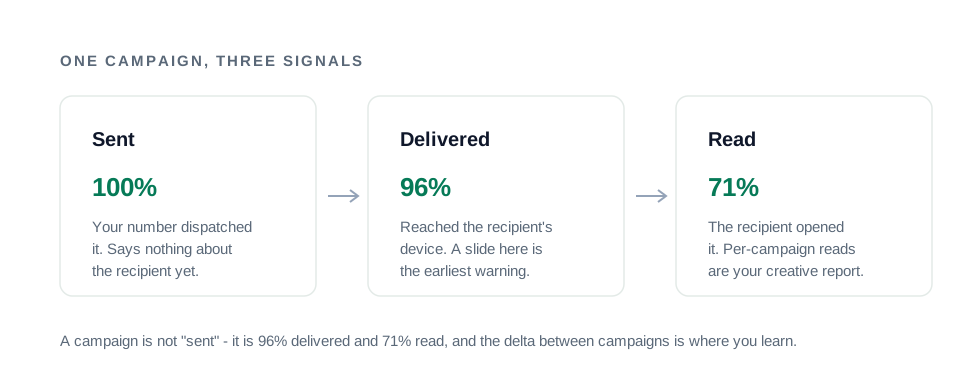
Deliverability, properly measured, is the ratio of the last two to the first. A campaign is not “sent” - it is 96% delivered and 71% read, and the delta between campaigns is where you learn. When sends succeed but deliveries sag, the platform is telling you something about your number or your list; that signal is the earliest warning you will ever get, and most tools never surface it.
The two reputations your number carries
Two things follow every WhatsApp number, and they fail differently.
The behavior reputation is what the platform watches: who you message, how they react, what your volumes look like hour to hour, whether dead numbers get messaged, whether people report you. The WhatsApp Terms of Service draw the line this score polices - unsolicited bulk messaging and automated spam are named violations. This is the reputation you earn - and only you can earn it.
The network identity is where your messages physically leave from. On a shared server, your campaigns depart from the same infrastructure as every other customer of that tool, and their volume spikes and complaint waves land on the same identity as yours. You can behave perfectly and still inherit a stranger’s penalty - the shared IP vs dedicated IP guide dissects exactly what that costs and what a private IP does and does not fix.
Automate’s whole architecture separates the second so you can concentrate on the first: every account is a dedicated VPS with a private IP and its own database - the infrastructure section covers it. But be clear about the division of labor: infrastructure isolates you from other people’s behavior. Your own behavior is still yours.
The protection stack, layer by layer
A number stays healthy when its days look like a person’s: it checks that a contact exists before writing to them, it starts slow, it varies everything, it pauses often, and it stops when something looks wrong. Automate builds each of those instincts into the queue as an automatic layer:
| Layer | What it does | Why it protects you |
|---|---|---|
| Number validation | Resolves the recipient against WhatsApp before every send | Non-registered numbers are never messaged |
| Warm-up ramp | New numbers start at 20/day and grow ~1.6x daily | No full-volume launch from day one |
| Daily + hourly limits | Default 100/day and 30/hour per number | No burst-and-idle shapes |
| Randomized delays | 10-60 s pauses, drawn at random | No machine cadence |
| Randomized send order | Picks from the next 50 queued contacts at random | CSV order never leaks as a pattern |
| Coffee breaks | A 15-minute pause after every 30 messages | Deliberate idling, like a person |
| Quiet hours | Your window plus the recipient’s local time | No 3 a.m. deliveries, anywhere |
| Typing indicator | “typing…” shown per message, scaled to its length | Messages arrive mid-conversation |
| Media variation | Images re-encoded per recipient | No identical file hash across thousands |
| Circuit breaker | Auto-pause on 5 straight failures or one hard signal | Temporary trouble never becomes permanent |
| Opt-out capture + suppression | STOP replies suppress the number everywhere, instantly | Unwanted senders get removed, not reported |
The next sections take the layers that deserve explanation.
Validate before you send
The single strongest spam signal a list can produce is messaging numbers that are not on WhatsApp. Ordinary people never do it - they text people who exist. Bulk senders with stale lists do it constantly, and enforcement systems know it.
So validation happens before every send: the recipient is resolved against WhatsApp first, and numbers that are not registered are skipped permanently - no message attempted, nothing dispatched, no quota burned. The results are cached for 30 days, so each number costs one lookup however many campaigns it appears in, and the lookup also repairs silent country-code formatting problems that would otherwise never deliver.
The list-hygiene consequence is direct: every import permanently labels the dead weight, so your failure counts come to reflect your real audience. A list full of not-on-WhatsApp rows is telling you something about where it came from - usually that it is stale, or that it was never opted-in at all.
Warm up: earn your volume
A brand-new number sending at full volume on day one is the most recognizable bulk pattern there is. Real people’s numbers grow into their volume.
Warm-up automates that growth: a freshly linked number starts at 20 messages a day and the cap grows about 1.6x per day - roughly 20, 32, 51, 82, 131, 210 - until it reaches your configured daily limit, typically within a week. The ramp keys off when the connection was created, so re-linking an established number does not restart it, and it can be turned off per connection for numbers you know are already warm.
The full warm-up schedule with the day-by-day numbers explains the reasoning and the mistakes to avoid. The one-line version: never disable warm-up on a brand-new number - it is the single best thing you can do to keep it.
Ceilings: why limits are a feature
Two ceilings govern every number: a daily limit (default 100) and an hourly limit (default 30). The hourly one exists because a daily cap alone allows a shape no human produces - 100 messages in one morning burst, then 23 idle hours.
When a ceiling is reached, the queue parks itself and says when it will resume. Both sent and failed dispatches count, and - importantly - the count lives outside your delivery history: clearing history never resets a quota, so there is no accidental (or deliberate) way to erode the limits that protect the number.
Plan allowances work the same way at a higher level. The 15,000 to 75,000 monthly messages a plan includes are ceilings, not targets: a single healthy number carries 100-300 a day, which is why real volume comes from running several numbers - and why the plans include 2, 5, or 10 lines.
Randomness: the enemy of bulk-sender patterns
Bulk senders are regular by nature: identical intervals, identical order, identical text. People are not. Two automatic layers attack the regularity.
The pause between messages is drawn at random between your minimum and maximum (10-60 seconds by default), so intervals never repeat. And the send order is randomized within the queue - the worker picks from the next 50 pending contacts at random rather than walking the CSV top to bottom, because exact list order (by area code, alphabetically, by batch) is itself a pattern worth avoiding. Spintax then varies the wording per recipient - the personalization demo shows that engine live.
Breaks and quiet hours
Two more layers schedule the silence, because silence is part of a human day.
Coffee breaks pause the queue for 15 minutes after every 30 messages by default, and the break counter survives restarts - a crash cannot silently skip the rest. Quiet hours come in two layers: your own window (10 PM to 8 AM by default, correctly spanning midnight) and, on top of that, each recipient’s approximate local time, derived from the country calling code - so a contact in another country never gets your afternoon at their 3 a.m. The queue parks through the window and resumes after, resume time stated. For choosing the hours to schedule inside that window, the best time to send guide covers the send windows that earn reads - and why frequency, not the clock, decides most of it.
The human touches: typing and media
Two details most tools skip, both visible to the recipient.
Before each message lands, the recipient sees “typing…” for a duration scaled to the message’s length - longer messages type for longer, with jitter - and then it arrives the way a person’s message would. And images are re-encoded slightly per recipient - different quality, different width, metadata stripped - so a 500-person campaign is not one identical file delivered 500 times. Small things. Exactly the kind of small things that separate a sender who lasts from one who does not.
Stop when something is wrong
When a number runs into trouble, pushing on is how a temporary restriction becomes a permanent ban. The circuit breaker encodes the discipline of stopping: five consecutive failures pause the queue automatically, and one unmistakable signal - rate limited, blocked, unauthorized, a dead session - pauses immediately rather than waiting. Resuming after a trip is always a deliberate operator decision: check the connection with a test message first, then continue. And if the worst has already happened, the restricted-number recovery guide is the calm, step-by-step plan for it.
The complement runs on the audience side: a reply like STOP suppresses the number across every connection instantly and cancels everything queued for them - the consent guide covers why that speed matters as much as the pause.
Measure it: the health report
Every connection gets an outcome report that turns raw counts into a verdict: the failure rate with its breakdown (not on WhatsApp, opted out, send errors, connection errors), delivery and read rates from WhatsApp acknowledgements over the last seven days, and a health label - ok normally, warning above a 10% failure rate or under 50% delivery, critical past 25% - judged only after enough attempts make the ratio meaningful.
The habit that keeps numbers alive is simple: read the trend, not the campaign. A delivery rate sliding from 96% to 91% to 84% is the platform telling you something is changing, several days before a circuit breaker has to say it out loud.
The foundation under everything
Every layer above assumes the one thing software cannot supply: a list of people who actually asked to hear from you. Consent is what makes the signals positive - reads, replies, forwards - instead of the blocks and reports that no pacing can outrun. The opt-in guide covers the touchpoints and wording; the restricted-numbers guide explains what happens when it is missing; and the playbook fits deliverability into the whole campaign system.
If you would rather run all of this on infrastructure that is yours alone - dedicated server, private IP, every control on by default - the plans are one screen, and the product documentation explains every control in it.