Whatso Alternative: Why Dedicated Cloud VPS Beats Desktop WhatsApp Senders (2026)
Frustrated by WhatsApp bans or desktop crashes with Whatso? Compare desktop bulk sender software with dedicated cloud VPS infrastructure, spintax variation, and smart pacing.
For small business owners, agencies, and marketers seeking an affordable way to send WhatsApp campaigns without paying Meta’s steep per-message API fees, Whatso is often one of the first names that surfaces in online searches.
Whatso appeals to buyers because it offers an inexpensive license that bypasses Meta’s API by automating WhatsApp Web on a local Windows PC.
However, after running their first few campaigns, many users encounter severe operational roadblocks: frozen laptops, crashed browser sessions, and worst of all, permanent WhatsApp number bans.
If you are evaluating Whatso or searching for a robust, cloud-based Whatso alternative, this guide explains why desktop software struggles with modern deliverability and how dedicated cloud infrastructure provides a safer, automated solution.
The problem with desktop WhatsApp senders
Desktop senders like Whatso, WhatSender, and browser extensions automate WhatsApp Web via browser injection scripts or UI macros running on your personal workstation. While simple in concept, this model introduces critical vulnerabilities:
- Host hostage syndrome: Your computer must remain powered on, awake, and connected to the internet for hours while a campaign dispatches. If your laptop enters sleep mode, drops Wi-Fi, or crashes, the campaign aborts midway, leaving you with duplicate messages or unlogged failures.
- Local IP pollution: Every message originates from your home, office, or mobile hotspot IP address. Consumer internet service providers (ISPs) and dynamic IP pools share addresses with millions of users. If an IP has a poor history or experiences sudden burst spikes, Meta’s security algorithms flag the session immediately.
- Identical message copy: Most desktop senders allow basic merge tags (like
{Name}), but the body of the message remains identical across thousands of sends. To Meta’s automated spam engines, 1,000 identical message hashes sent in rapid succession is the textbook signature of a spam bot. - No automated quiet-hours protection: If a desktop campaign is scheduled poorly or runs longer than anticipated, messages blast through the night, prompting angry recipients to click “Report and Block”—the single fastest path to an account suspension.
Whatso vs Automate: Architecture and features compared
| Capability | Whatso (Desktop) | Automate (Cloud VPS) |
|---|---|---|
| Hosting Environment | Local PC (Windows only; must stay awake) | 24/7 Dedicated Cloud VPS (Web-based) |
| IP Address | Your shared local/home Wi-Fi IP | Private, isolated static IP per customer |
| Message Personalization | Basic {Name} replacement | Full Nested Spintax variation + CSV tags |
| Send Cadence & Pacing | Static interval timer | Randomized human pacing + Warm-up ramps |
| Quiet Hours Governance | Manual user management | Automated overnight pause (10 PM – 8 AM) |
| Multi-Line Support | 1 line active per desktop instance | 2, 5, or 10 lines with load balancing |
| In-Flight Controls | Basic cancel | Real-time pause, resume, and line failover |
| Operating System | Windows desktop only | Works on any device (Mac, Windows, Mobile) |
Why desktop senders get numbers banned (The 4 triggers)
Meta does not monitor the content of end-to-end encrypted chats, but their network telemetry constantly monitors metadata, dispatch cadence, and user feedback. Desktop senders trigger bans by tripping four automated tripwires:
| Desktop Tool Vulnerability | How Desktop Senders Trigger a Ban | How Automate Cloud VPS Prevents It |
|---|---|---|
| 1. Identical Payload Hashes | Blasting the same static message body to 1,000 contacts trips duplicate message pattern detectors. | Dynamic Spintax syntax {Hi|Hello|Greetings} permutes text on each dispatch, producing hundreds of unique message variations. |
| 2. Robotic Interval Cadence | Desktop timers send at rigid intervals (e.g. exactly 5.0s), matching automated bot signatures. | Randomized human jitter (10–60s variable gaps with 15-min coffee breaks) mimics natural human typing and conversational intervals. |
| 3. Shared Residential / Office IP | Residential Wi-Fi and consumer ISP IPs are shared across thousands of users and easily blacklisted. | Single-tenant dedicated VPS with an isolated static IPv4 address used exclusively by your account. |
| 4. Cold Volume Spikes | Firing 500+ broadcasts on day one without prior chat history flags abuse detection instantly. | Automated 7-day warm-up curves gradually escalate daily message volume from 20 to 300+ messages per line (1.6x daily ramp). |
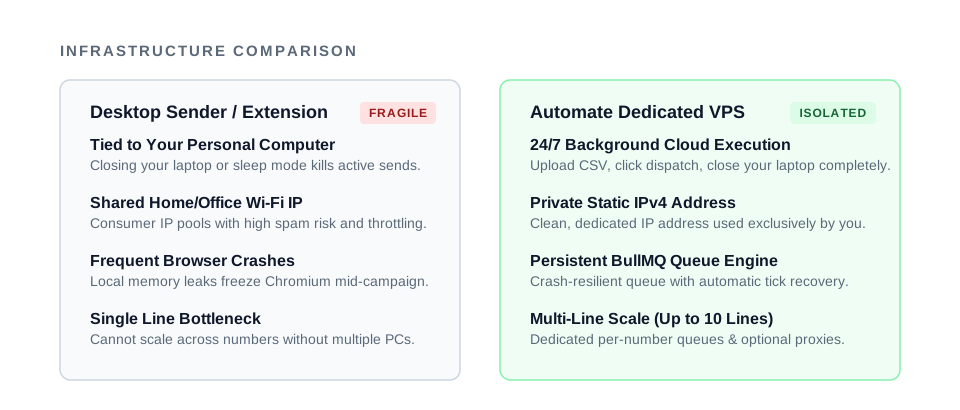
To protect your business numbers, sending software must address all four triggers programmatically.
The dedicated Cloud VPS advantage
Automate was built to eliminate the fragile desktop model entirely by providing single-tenant cloud infrastructure:
1. Hands-Free 24/7 Cloud Execution
Your instance runs on its own dedicated virtual private server in a tier-3 data center. You upload your CSV contact list, configure your spintax template, click “Dispatch”, and close your laptop. The campaign runs smoothly in the background according to safe rate ceilings.
2. Clean, Isolated Private Static IP
Unlike shared SaaS platforms (where spam from another user can blackball your server) and unlike home Wi-Fi networks, Automate provisions a clean, dedicated IPv4 address exclusively for your account. Your sender reputation belongs to you alone. Learn more in our shared vs dedicated IP guide.
3. Multi-Line Load Balancing
Rather than stressing a single phone number with heavy volume, Automate connects 2, 5, or 10 separate WhatsApp lines (depending on your plan). Each connected line runs its own isolated queue with custom delay settings and optional proxy bindings (100–300 messages per number per day).
Spintax and smart pacing: how real deliverability works
Avoiding spam filters requires your broadcast to look and behave like a genuine human conversation. Automate achieves this through two native engines:
1. Nested Spintax Engine
Instead of blasting identical promotional text, you write templates using spintax syntax:
{Hi|Hello|Hey} {name}! {Our seasonal catalog|The new collection|Our latest price list}
is now available. {Take a look here|Check it out|Download the PDF below}: {link}
The engine permutes these choices dynamically for every single contact. Maria receives one sentence structure, James receives another, and Priya receives a third. No two messages share an identical cryptographic signature. Explore our complete spintax guide for detailed examples.
2. Variable Dispatch Pacing & Quiet Hours
Automate intersperses randomized delays (e.g., 10 to 60 seconds with 15-minute coffee breaks) between dispatches to replicate natural typing rhythms. If a campaign extends past 10:00 PM in the recipient’s timezone, dispatch pauses automatically until 8:00 AM the next morning, avoiding late-night blocks and complying with WhatsApp’s Business Messaging Policy.
Migration checklist: moving from Whatso to Automate
Switching from Whatso to Automate takes under 15 minutes:
- Export Your Contact Lists: Export your verified customer phone numbers and custom columns from your existing Excel or CSV files (formatted to RFC 4180 CSV standard).
- Choose Your Capacity: Select an Automate plan (Starter, Growth, or Enterprise) based on your required monthly volume and number of connected lines.
- Provisioning: Within 2 business days, your dedicated VPS and private IP are fully configured and your credentials delivered.
- Scan & Dispatch: Log into your browser dashboard, scan the multi-device QR code with your business phone, import your CSV, and schedule your first paced campaign.
Check out our step-by-step campaign setup guide or explore software pricing compared to learn more.